사담
발등에 불이 떨어졌어요
1. 과제 진행 과정
LV0 ) API 명세서를 작성
https://www.notion.so/API-2fc55c64ceb28017ac38da3959e4289b?source=copy_link
일정 관리 앱 API 명세서 | Notion
API 명세서: 일정 관리 앱 - version: 1.0.0 - Base URL:
www.notion.so
아직 도전과제는 꿈도 못꾸는 시작단계라서 그 부분은 아직 작성 x
하지만 댓글까지 관리하게 되는 경우를 생각해서 ERD를 작성해봤다 완전 미완성이니... 주의해서 보시기
댓글에도 Writer 가 존재하니까 writer table 을 분리해줘야하나 고민중
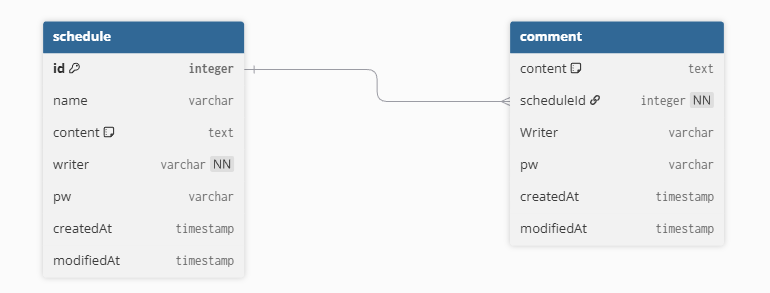
ERD 사이트
dbdiagram.io - Database Relationship Diagrams Design Tool
dbdiagram.io
LV1~LV4 ) POST/GET/PUT/DELETE 구현
프로젝트 명 -> schedule
종속성은 실습에서 했던 그대로 따라감
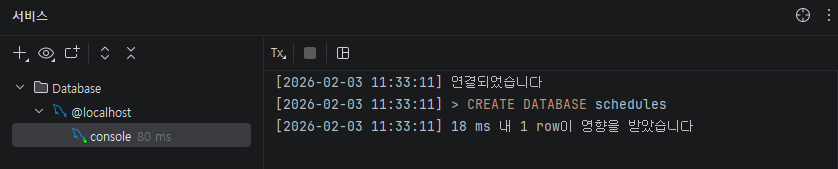
Propertise 설정 ~ DB 연결
1. 기본설정 해주기
- 1) Entity 생성 (Schedule) 하고 Annotation 붙여주기
- 2) Controller, Service 에 개별 Annotation과 @RequiredArgsConstructor 붙이기
- 3) Repository 는 JpaRepository 를 상속받을 수 있게 함
2. BaseEntity 추가해주고 Schedule 이 상속받을 수 있게 함
import jakarta.persistence.*;
import lombok.Getter;
import org.springframework.data.annotation.CreatedDate;
import org.springframework.data.annotation.LastModifiedDate;
import org.springframework.data.jpa.domain.support.AuditingEntityListener;

import java.time.LocalDateTime;

@EntityListeners(AuditingEntityListener.class)
@Getter
@MappedSuperclass
public abstract class BaseEntity {
    @CreatedDate
    @Column(updatable = false)
    @Temporal(TemporalType.TIMESTAMP)
    private LocalDateTime createdAt;

    @LastModifiedDate
    @Temporal(TemporalType.TIMESTAMP)
    private LocalDateTime modifiedAt;
}
3. ControllerㅡService 만들면서 DTO 를 추가해주며 기본 코드 완성하기
실습과 다르게 구현한 부분
(1) 트러블슈팅 2-<1> get 에 체크로직을 하나 더 작성하여 writer 가 들어오지 않거나 null 인 경우에 전체 schedule 이 출력
(2) Post 에 pw 를 받아와서 체크하는 로직 작성
# ScheduleService class 의 UpdateScheduleResponse

if (!request.getPw().equalsIgnoreCase(schedule.getPw())){
    throw new WrongPasswordException("비밀번호가 일치하지 않습니다.");
}
# 이후 수정코드가 나옴

# 새로 exception 을 만들어줌

public class WrongPasswordException extends RuntimeException {
    public WrongPasswordException(String message) {
        super(message);
    }
}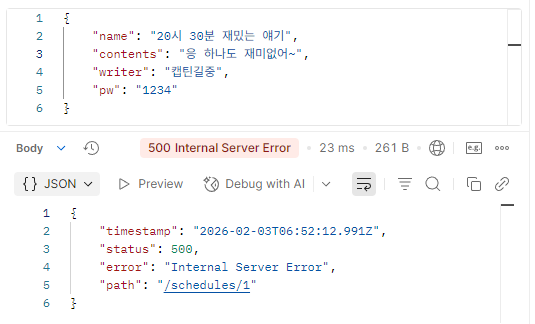
pw 가 틀렸다면 console 에 비밀번호가 일치하지 않습니다 메시지 출력, 수정되지 않음

(3) DeleteScheduleRequest DTO 작성
import lombok.Getter;

@Getter
public class DeleteScheduleRequest {
    private String pw;
}
4. DB가 잘 완성되었는지 확인하고, 세부적인 부분 추가해주기 (정렬 등)
+ 신나서 git에 push 도 안 하고 코드를 GET 까지 작성했다... 후딱 git 과 연동해주기
https://kjw81024.tistory.com/32
Local -> Git 업로드
1. Repository 만들기 2. 로컬 파일 저장한곳 찾아서 우클릭 -> Open Git Bash here 3. 명령어 따라 작성 git initgit remote add origin http://github.com/{github 이름}/{repository 이름}.git# 그냥 git repository 에서 URL copy 해서
kjw81024.tistory.com
2. 트러블 슈팅
<1> GET (Writer 기준)
writer 를 queryString 으로 받아서 와야 필수가 아닌 선택값이 되는데, writer 를 기준으로 GET 요청을 쓸 때 findAll 을 사용하게 되면 for 문 안에서 if 문으로 처리를 해줘야하는지
writer을 required= false 로 처리했는데 writer 값을 주지 않은 경우 writer 는 null 로 처리되는지
일단 실험을 해봤다 (수정삭제 시작도 안 했는데.. ㅎㅎ)
public List<GetScheduleResponse> getUserSchedule(String writer) {
    List<Schedule> schedules = scheduleRepository.findAll();
    List<GetScheduleResponse> dtos = new ArrayList<>();
    System.out.println("*** writer : "+writer);
    for (Schedule schedule : schedules) {
        if (schedule.getWriter().equalsIgnoreCase(writer)){
            GetScheduleResponse dto = new GetScheduleResponse(
                    schedule.getId(),
                    schedule.getName(),
                    schedule.getContents(),
                    schedule.getWriter(),
                    schedule.getCreatedAt(),
                    schedule.getModifiedAt()
            );
            dtos.add(dto);
        }
    }

    return dtos;
}
코드를 위처럼 작성하고 실험
| Postman 입력 | Console 출력 | Postman 출력 |
| http://localhost:8080/schedules?writer= |  |
[] |
| http://localhost:8080/schedules?writer=냐냐냥 (존재하지 않는 Writer) |
 |
[] |
| http://localhost:8080/schedules?writer=권지원 (존재하는 Writer) |
 |
id 가 부여된 정상 출력 |
| http://localhost:8080/schedules |  |
[] |
결과는 위와 같음
찾아봐야 하는 부분
-> writer 값이 없어도 매개변수가 전달은 되는데 (공백으로) 이걸 어떻게 확인할 수 있는가, 정확히 어떤 값으로 전달되는가
공백 또는 null 값이 들어왔을 때 Postman 에 전체 값이 출력되면 된다
java.lang.NullPointerException: Cannot invoke "String.isEmpty()" because "writer" is null

writer 이 null 이면 isEmpty 가 검사하기 전에 nullPointerException 으로 터짐
-> 순서 바꿔주기
java 의 || (or 연산자) 는 앞에꺼부터 검사하고 결과값을 얻으면 뒷 조건은 검사를 안 함
public List<GetScheduleResponse> getUserSchedule(String writer) {
	# Schedule list와 GetScheduleResponse list 초기화, 선언
    List<Schedule> schedules = scheduleRepository.findAll();
    List<GetScheduleResponse> dtos = new ArrayList<>();

    # 입력이 비어있거나, null 인 경우
    if (writer==null||writer.isEmpty()){
        System.out.println("Writer is empty now!");
        # 전체 Schedule 을 dto 에 담고
        for (Schedule schedule : schedules) {
            GetScheduleResponse dto = new GetScheduleResponse(
                    schedule.getId(),
                    schedule.getName(),
                    schedule.getContents(),
                    schedule.getWriter(),
                    schedule.getCreatedAt(),
                    schedule.getModifiedAt()
            );
            dtos.add(dto);
        }
        # dtos 반환
        return dtos;
    }

	# 입력이 비어있지 않고 주어진 경우
    for (Schedule schedule : schedules) {
    	# 동일 값이 있는지 확인하며 dto 에 담고
        if (schedule.getWriter().equalsIgnoreCase(writer)){
            GetScheduleResponse dto = new GetScheduleResponse(
                    schedule.getId(),
                    schedule.getName(),
                    schedule.getContents(),
                    schedule.getWriter(),
                    schedule.getCreatedAt(),
                    schedule.getModifiedAt()
            );
            dtos.add(dto);
        }
    }
    # dtos 반환
    return dtos;
}
조금 .... 코드가 더러워졌지만 일단 정상적으로 출력 된다
<2> POST
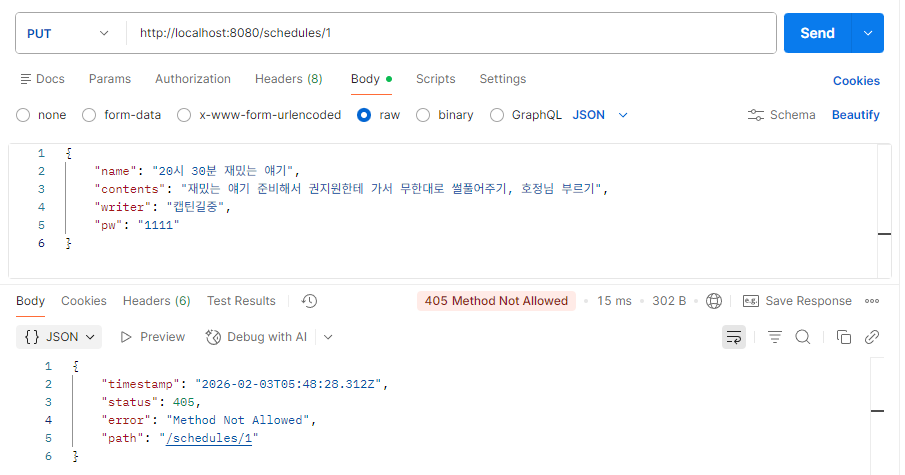
문제: 405 오류 -> 웹 서버가 클라이언트의 요청을 인식했으나, 해당 리소스에서 그 HTTP 메서드를 지원하지 않을 때 발생
해결: @PutMapping 을 @PostMapping 으로 오타를 내서 생긴 문제였습니다. 고쳐주니 정상적으로 동작
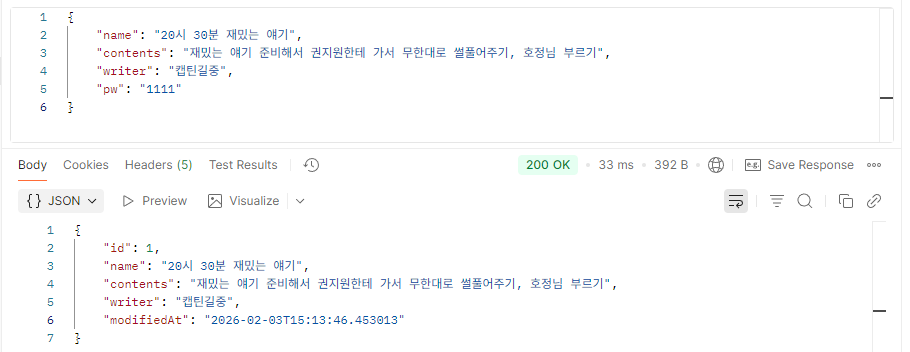
문제: modified 시간이 바뀌지 않고, GET을 써도 바뀌기 전 상태로 출력되는 걸 보니까 DB에 업데이트가 안 된 듯 함
해결: @Transactional 안에 안 넣어서 생긴 문제였다
더티체킹의 조건... 다시한번 상기시키고 넘어가기 : 트랜잭션 안에 영속상태 객체에 대해 업데이트 가능
+ update 로직에 modifedAt 넣어주지 않기 -> 넣으면 create시점에 null 로 초기화됨
필수과제 끝
'SPARTA 과제 > SPRING' 카테고리의 다른 글
| 숙련) 일정관리앱 트러블슈팅 (1) (0) | 2026.02.11 |
|---|---|
| 숙련) 일정관리앱 업그레이드 초기설정 (1) | 2026.02.10 |
| Schedule README (0) | 2026.02.05 |
| 유저 입력 검증 (0) | 2026.02.04 |
| 댓글 기능 구현, 정렬 (0) | 2026.02.04 |